

Bulk SMS Australia - Business Messaging With Replies
Send bulk SMS to your whole list, then handle the replies in one place.

Send from your own Australian mobile number and every reply arrives in a shared conversation view your team already watches.
Every campaign, including send now, waits five minutes before it goes out. Long enough to catch the wrong list.
A live segment and cost estimate as you type, so a stray emoji does not quietly turn one message into three.
Same portal, same login, same numbers, same bill. No second supplier and no integration project.
Business SMS that expects an answer.
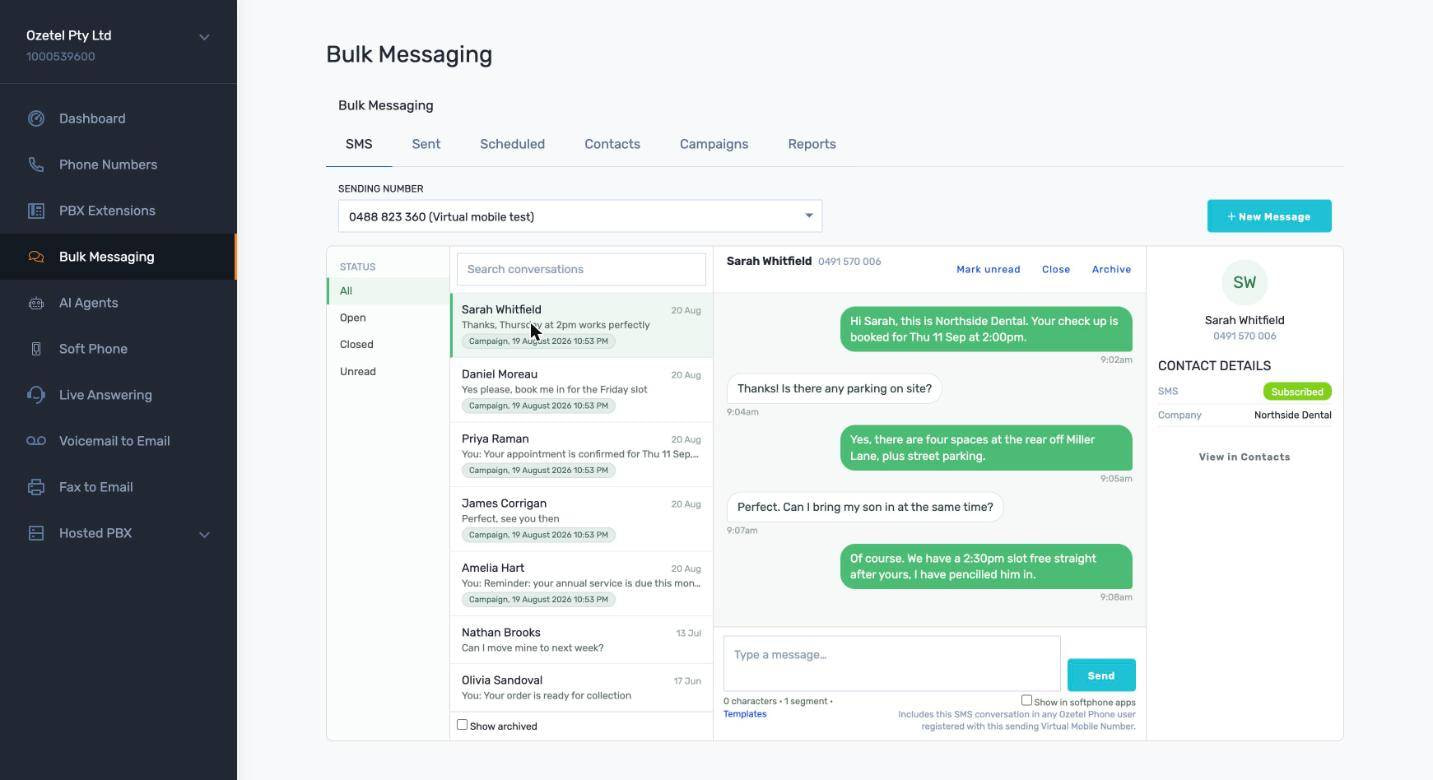
Two way SMS, not just broadcasts
One shared view
One to one, any time
Replies to campaigns come here
Visible on the handsets
Send a bulk SMS campaign in minutes
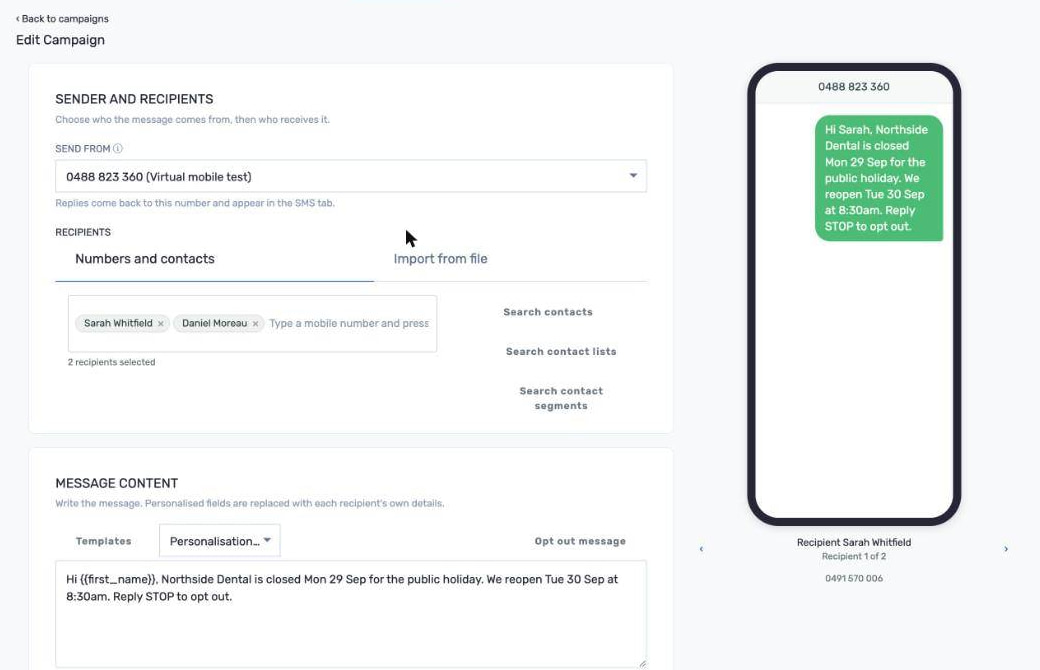
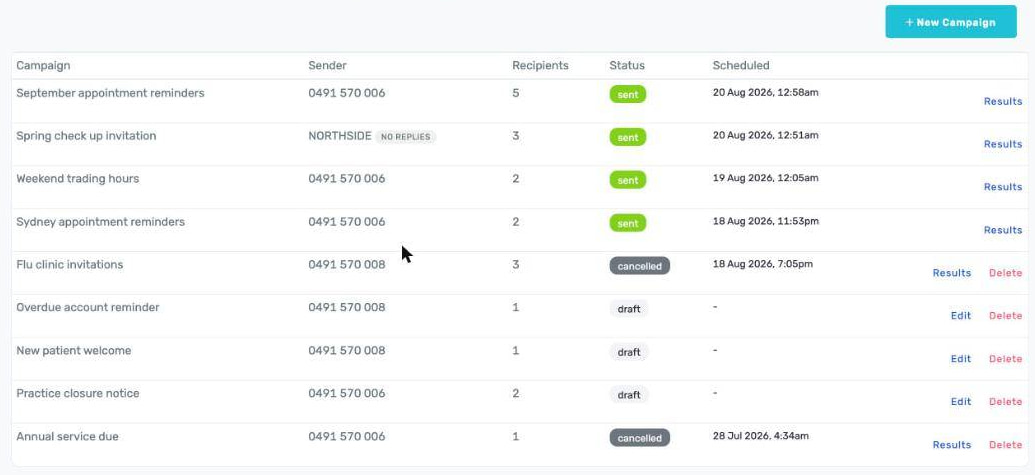
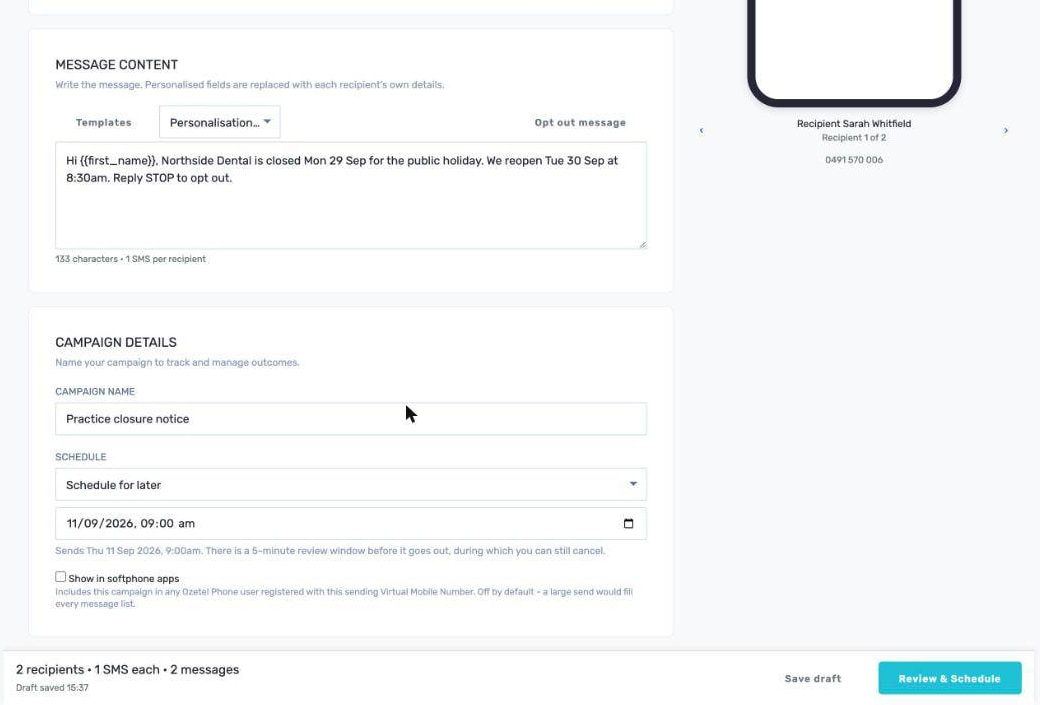
Schedule an SMS campaign, and change your mind
Cancel during the hold
Checked again at dispatch
No double sends
Quiet by default
One SMS contact list, shared with your team's handsets
Shared with Ozetel Phone
Imports stay out of the way
CSV import with mapping
Your list maintains itself
Bulk SMS for every type of Australian business
Clinics and allied health
Trades and services
Retail, salons and gyms
Schools, clubs and community groups
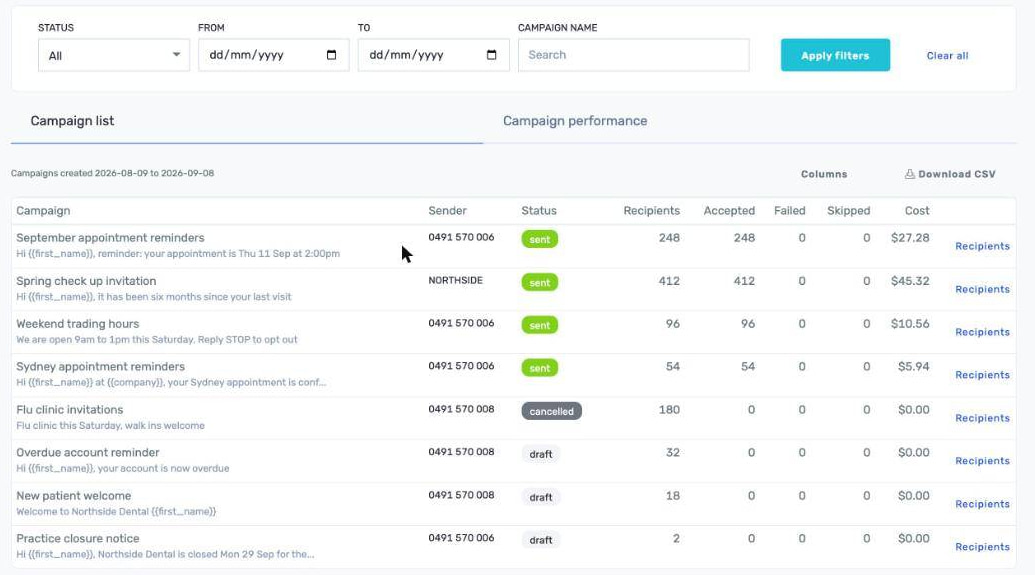
SMS reporting: know what you sent, and to whom
SMS sender ID and opt out handling built in
How much bulk SMS costs in Australia
Business SMS built into your Ozetel phone system
Your own numbers
One bill
A number a team can watch
Switched on deliberately
Common questions about business SMS.
Yes, when the campaign is sent from one of your Australian virtual mobile numbers. Replies arrive as threads in the SMS tab of the portal, grouped by the customer's number, and they appear alongside every other conversation your team is already watching. A campaign sent from an alphanumeric sender ID cannot take replies, because an alphanumeric sender cannot receive messages.
You send from your own numbers. Campaigns go out from a virtual mobile number on your account, and broadcast sending is available on numbers that have been capacity checked for it, so we will confirm with you which of your numbers can be used for campaigns. One to one conversations in the SMS tab are not restricted that way. A single virtual mobile number can be watched by several Ozetel Phone users, so a shared business number does not end up as one person's private inbox.
An alphanumeric sender ID shows your business name in place of a phone number when the message arrives. It suits announcements and notices where the brand name matters more than a reply, because the recipient cannot answer it. Sender IDs are registered with the ACMA, and the portal shows you when one is expiring soon. If you expect people to answer, send from a virtual mobile number instead.
Australian marketing messages must carry a functional way to unsubscribe. In practice that means telling recipients they can reply STOP when you send from a virtual mobile number, or linking the hosted opt out page when you send from an alphanumeric sender ID, since a STOP reply cannot reach an alphanumeric sender. Ozetel handles both, but the wording in the message body is yours to include.
Inbound STOP, UNSUBSCRIBE, OPTOUT, OPT OUT, OPT-OUT, CANCEL, END and QUIT are matched as whole words, whatever the case, and recorded automatically. Opt outs are scoped per sender ID rather than blanket across the account, so somebody who opts out of one brand you send as has not asked to stop hearing from another. The opt out list is checked again at dispatch, so anyone who opts out during the five minute hold window is skipped rather than messaged.
One SMS is 160 characters in the standard GSM alphabet. A single character outside that alphabet, an emoji or a curly quote pasted out of Word, drops the whole message to 70 characters. Messages longer than a single part carry a header, so the per part limit falls to 153 characters, or 67 for a non GSM message. The composer counts this as you type, so you can see a short message become a three part message before you send it to a large list.
Yes. Choose send now or pick a date and time, and either way the campaign passes through a five minute hold window before dispatch. You can cancel it during that window from the Scheduled tab. The recipient set and every merged message are frozen when the campaign is scheduled, so what you reviewed is what goes out.
Yes, through mail merge. Placeholders such as {{first_name}} are replaced with each recipient's own details from your contact book, across the full contact field set. A live phone preview shows the finished message exactly as the recipient will see it, and you can step through the first five recipients to check the merge. The review step before scheduling re merges every recipient on the server, so the preview cannot disagree with what is actually sent.
Your account has one contact book covering name, company, job title, email, address and tags. You can import a CSV and map its columns to those fields, organise people into groups, which are static lists, or into segments, which are saved rules such as "city is Sydney and tags contain VIP". A segment is resolved against the contact book each time it is used, so newly added contacts are picked up without anybody rebuilding the list. You can also send a campaign from an uploaded file whose rows are messaged without ever becoming contacts.
Outbound messages are 6c per segment and inbound replies are 2c per segment, excluding GST, billed on your Ozetel account on the same invoice as the rest of your services, so there is no separate bill from a separate vendor. The composer shows a live cost estimate as you build a campaign. That figure is an estimate: the billed amount is calculated by the billing system and can differ for multipart or non GSM messages. Prepaid accounts are balance checked before scheduling and again at dispatch. Talk to us and we will quote against the numbers you actually send from.
You need an Ozetel account with at least one virtual mobile number to send from, and Bulk Messaging is enabled per account by our team rather than being switched on for everybody by default. You do not have to move your phone system across to use it, although it shares one portal, one contact book and one bill with the rest of your Ozetel services if you do.
Marketing messages in Australia are regulated under the Spam Act 2003, which requires consent from the recipient, clear identification of the sender, and a functional unsubscribe. Bulk Messaging is built to help you meet those obligations, with automatic STOP handling, per sender opt out scoping and a hosted opt out page for alphanumeric sends. This is general information rather than legal advice, so check your own obligations if you are unsure.
Virtual mobile number or alphanumeric sender ID?
| Feature | Your virtual mobile number | Alphanumeric sender ID |
|---|---|---|
| What the recipient sees | Your Australian mobile number. | Your business name, as registered. |
| Can they reply | Yes. Replies arrive in the SMS conversation view. | No. An alphanumeric sender cannot receive messages. |
| How people opt out | They reply STOP, and it is recorded automatically. | Through the hosted opt out page you link in the message. |
| Best for | Reminders, confirmations and anything you expect an answer to. | Announcements and notices where the brand name matters most. |
| Getting set up | Use a virtual mobile number on your account. | Register the sender ID with the ACMA. The portal flags one that is expiring. |